Carl
Member
Registered: 9th May 04
Location: Jimmy Bennett's la la land.
User status: Offline
|
do i just take the cd writter out and put the cables that were in that into the dvd writter?
|
_Allan_
Member
Registered: 24th Mar 04
User status: Offline
|
Yes, you might have to check the master or slave jumpers on the back depending on what the CD writer was set to.
|
Carl
Member
Registered: 9th May 04
Location: Jimmy Bennett's la la land.
User status: Offline
|
quote:
Originally posted by _Allan_
Yes, you might have to check the master or slave jumpers on the back depending on what the CD writer was set to.
right, so what am i looking for, not very good when it comes to computer stuff?
|
TNM
Member
Registered: 5th Apr 04
Location: Nottingham Drives: VW Tiguan
User status: Offline
|
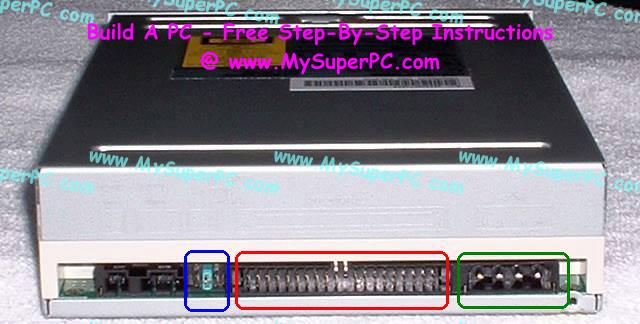
|
Carl
Member
Registered: 9th May 04
Location: Jimmy Bennett's la la land.
User status: Offline
|
what should be going on at the blue box then?
|
TNM
Member
Registered: 5th Apr 04
Location: Nottingham Drives: VW Tiguan
User status: Offline
|
depends what your old one is set to. just set it the same.
|
Carl
Member
Registered: 9th May 04
Location: Jimmy Bennett's la la land.
User status: Offline
|
quote:
Originally posted by TNM
depends what your old one is set to. just set it the same.
 off to attempt it! off to attempt it!
|
_Allan_
Member
Registered: 24th Mar 04
User status: Offline
|
quote:
Originally posted by TNM
depends what your old one is set to. just set it the same.
yesh, sorry I should have said that in my previous.
|
Carl
Member
Registered: 9th May 04
Location: Jimmy Bennett's la la land.
User status: Offline
|
right ive fitted it but came to a problem, there where only 3 options on the old writer and there was 5 on this, should i put it in the middle one, put it in the second one at first and it was ejecting tray and not booting up, put it in the end one this time and its booted up but ive no cd drive accoring to my computer?
|
Carl
Member
Registered: 9th May 04
Location: Jimmy Bennett's la la land.
User status: Offline
|
scrap that, got it hooked up now, got no disk with it though is that right? its a pioneer 109. do i need to get some software off the net?
|
_Allan_
Member
Registered: 24th Mar 04
User status: Offline
|
quote:
Originally posted by CrazyCarlo
scrap that, got it hooked up now, got no disk with it though is that right? its a pioneer 109. do i need to get some software off the net?
Nope standard windows drivers are fine
|
Carl
Member
Registered: 9th May 04
Location: Jimmy Bennett's la la land.
User status: Offline
|
nice one, more or less up and running apart from i'm getting
"Playback failed due to an error with the audio subsystem. Please ensure the sound card is properly installed or close any applications that may use the sound card. "

no other apps running btw.
|
_Allan_
Member
Registered: 24th Mar 04
User status: Offline
|
Read This:
http://player.interactual.com/help/support/articles/0112.asp
personally I'd get another DVD prog like power dvd or windvd etc..
|
Carl
Member
Registered: 9th May 04
Location: Jimmy Bennett's la la land.
User status: Offline
|
all ready looked at that but made no sense to me, was just about to ask about other programs, cheers.
|
Skinz
Member
Registered: 15th May 03
User status: Offline
|
redownload gfx card and sound card drivers, and get latest directx
|
Carl
Member
Registered: 9th May 04
Location: Jimmy Bennett's la la land.
User status: Offline
|
quote:
Originally posted by Skinz
get latest directx
doing that now after it wouldn't let me install a program, do you reckon this may have been why the playback failed before?
|
Skinz
Member
Registered: 15th May 03
User status: Offline
|
maybe, try start > run > dvdplay
|
Carl
Member
Registered: 9th May 04
Location: Jimmy Bennett's la la land.
User status: Offline
|
had same error message with that. got it working on power dvd but it was proper jumpy. How do i re-install audio settings, not sure if i have a sound card or a built in jobby.
Cheers for the help.
|
sunnyb
Member
Registered: 21st Oct 03
Location: Kent, near Bluewater
User status: Offline
|
www.dvdrhelp.com
good site, if you're a beginner this can help you alot, as it did me!
|



